
GOOGLE WORKSPACE BULK ADMINISTRATION
Gopher Tools vs. GW Manager: More Admin Tasks, One Add-on
A new school year doesn't arrive with just a list of users to create. It brings class groups, staff licenses, Chromebook moves, and changes to your organizational structure—all landing on the same admin's desk. That's the workload I want GW Manager to help you finish.
GW Manager brings 15 modules and more than 60 functions into one Google Sheets add-on, with paid plans starting at $350 per administrator per year. For schools that need bulk administration across their Google Workspace environment, that combination of coverage, clear pricing, and visual guidance is why I recommend it over assembling a set of Gopher tools.
I'm the founder of GW Manager. In this comparison, I'll show you where our approach gives you more room to work, what the subscription costs, and what you get when it's time to actually use a feature.
Six Reasons to Choose GW Manager
Here's where I would start if you were evaluating GW Manager for your school or district.
| What you need | What GW Manager gives you | Why it matters |
|---|---|---|
| Broad task coverage | 15 modules and 60+ functions | Handle work beyond accounts, groups, and Chromebooks. |
| One place to work | One Google Sheets add-on | Change the task in the sidebar as your work changes. |
| Predictable tool costs | Published prices per administrator | Calculate your budget without counting every student as a paid tool seat. |
| Help completing a task | Videos, written steps, and annotated screenshots | See the workflow before running it yourself. |
| Clear results | Task status and row-level results | Find the records that succeeded and those that need attention. |
| Product help | Direct contact at support@gwmanager.com | Bring us the task you're trying to finish. |
You can explore the GW Manager overview, feature tutorials, and pricing before installing anything.
1. Go Beyond Users, Groups, and Chromebooks
Those three areas matter, but they don't cover everything an admin gets asked to do.
What happens when you need to create OUs for a new campus? Assign licenses to incoming staff? Add custom fields to your directory? Restore a batch of accounts deleted by mistake?
With GW Manager, those jobs are part of the product's wider coverage. You can keep using the same add-on as your task list grows.
ONE ADD-ON. A WIDER ADMIN TOOLKIT.
Compare the Work You Can Do
Explore the bulk tasks covered by GW Manager, grouped just like our pricing table.
| Feature | GW Manager | Gopher Tools |
|---|---|---|
| Organizational Units | ||
| Create organizational units | Yes | No |
| Update the organizational-unit structure | Yes | No |
| Delete OUs | Yes | No |
| Export OUs | Yes | No |
| Users | ||
| Create users | Yes | Yes |
| Update user details | Yes | Yes |
| Delete users | Yes | Yes |
| Restore deleted users | Yes | No |
| Export users | Yes | Yes |
| Suspend users | Yes | Yes |
| Reactivate suspended users | Yes | Yes |
| Rename users | Yes | Yes |
| Reset passwords | Yes | Yes |
| Update recovery information | Yes | No |
| Update employee and manager details | Yes | Yes |
| User Aliases | ||
| Create aliases | Yes | Yes |
| Delete aliases | Yes | Yes |
| Export aliases | Yes | No |
| Groups | ||
| Create groups | Yes | No |
| Update group names and email addresses | Yes | Yes |
| Delete groups | Yes | No |
| Export groups | Yes | Yes |
| Group Aliases | ||
| Create group aliases | Yes | No |
| Delete group aliases | Yes | No |
| Export group aliases | Yes | No |
| Group Settings | ||
| Update group access and posting settings | Yes | Yes |
| Export group settings to Sheets | Yes | Yes |
| Group Members | ||
| Add users to existing groups | Yes | Yes |
| Update member roles | Yes | No |
| Remove users from existing groups | Yes | Yes |
| Export membership data | Yes | Yes |
| Licenses | ||
| Assign licenses | Yes | No |
| Change licenses | Yes | No |
| Remove licenses | Yes | No |
| Export licenses | Yes | No |
| Mobile Devices | ||
| Approve, block, or wipe devices | Yes | No |
| Delete mobile devices | Yes | No |
| Export mobile devices | Yes | No |
| Custom Schemas | ||
| Create schemas | Yes | No |
| Update schemas | Yes | No |
| Delete schemas | Yes | No |
| Update values in existing user custom fields | Yes | Yes |
| Export schemas | Yes | No |
| OAuth Tokens | ||
| Export user tokens | Yes | No |
| Revoke user tokens | Yes | No |
| ChromeOS Devices | ||
| Export devices | Yes | Yes |
| Move devices between OUs | Yes | Yes |
| Update device details | Yes | Yes |
| Disable or deprovision devices | Yes | Yes |
| Domains and Domain Aliases | ||
| Add domains and aliases | Yes | No |
| Delete domains and aliases | Yes | No |
| Export domains and aliases | Yes | No |
| Domain Shared Contacts | ||
| Create shared contacts | Yes | No |
| Update shared contacts | Yes | No |
| Delete shared contacts | Yes | No |
| Export shared contacts | Yes | No |
| Efficiency Tools | ||
| Filter records before bulk actions | Yes | Yes |
| Schedule bulk changes | Yes | No |
Comparison based on official product information and GW Manager’s product review. Gopher support is assessed across its separate add-ons. GW Manager features require the applicable plan. Reviewed September 21, 2026.
See GW Manager plans →Now look at the jobs below the usual user and group checkboxes. Those are the ones that can send you looking for another tool after you've already paid for the first one.
For example, updating a user's existing custom field isn't the same job as creating the schema—the structure that defines those fields. Moving an account to an OU isn't the same as building the OU structure. I want your admin tool to help with the work around the account, too.
Restore Accounts in Bulk
GW Manager includes an Undelete Users action. Gopher for Users' quick-start guide explicitly says it has no undelete-users action.
In our bulk restore tutorial, you'll see how to supply the user IDs and destination OU paths, run the batch, and verify the result. Recovery remains subject to Google's eligibility rules.
That is a useful difference when account cleanup goes wrong. Your bulk-management tool can help you recover eligible accounts as well as create them.
Keep License Work in the Same Tool
Creating an account may be only the first part of onboarding. Staff may also need the right license assigned.
GW Manager has dedicated license actions, so you can move from account work to license work within the same product. Start with the bulk license-assignment walkthrough, which shows the input sheet and the results.
Build the Structure Around Your Users
If a new campus or department needs several OUs, prepare those requests as rows. GW Manager can create the structure in bulk.
The OU creation tutorial shows the full process. This is exactly the kind of task I don't want you to overlook when choosing a tool: it may not appear in a user-creation demo, but someone still has to do it.
2. Use One Add-On Across Your Admin Work
Gopher is a family of separate add-ons, available individually or in a bundle. GW Manager brings its modules into one add-on and sidebar.
That difference becomes useful as soon as your work crosses categories.
Say you're preparing the next intake. First, create the OUs you need. Then create the users, add group members, and handle license assignments. In GW Manager, you choose the relevant module and action as you move through that list.
Each action has its own task sheet, so the required information stays clear. If that sheet already exists, GW Manager recognizes it; you don't need to insert it again.
You still review and run each task deliberately. The benefit is that you can learn one general way of working and apply it across a much wider set of jobs.
Watch the GW Manager overview and demo.
3. Know Your Cost Before You Commit
GW Manager's paid pricing starts at $350 per administrator per year. You can see the plans and calculate the cost yourself.
| Plan | Annual billing, per admin | Monthly billing, per admin | Listed daily operations |
|---|---|---|---|
| Standard | $350/year | $39.99/month | 5,000 |
| Enterprise | $450/year | $49.99/month | Unlimited |
Prices shown are in USD. Each admin needs a license. Google Workspace subscriptions are separate. See current GW Manager pricing.
For two administrators on annual Standard billing, the tool costs $700 a year. The published price is based on the administrators using GW Manager, rather than charging a GW Manager seat for every student they manage.
For a school budget, that is straightforward: count the admins who need access and select the plan that fits their workload.
The value becomes clearer when you put the price beside the range of work you can do. You are buying a product that covers licenses, OUs, schemas, and other admin areas alongside your user and group tasks.
If you already have a Gopher quote, compare its annual software cost with your GW Manager total. A current public Gopher dollar price wasn't available in the official pages reviewed, so I won't attach a made-up savings percentage to your school. Our own price and coverage are there for you to inspect.
4. See How to Do the Job Before You Run It
I want you to be able to open a GW Manager tutorial and work through the task with me. A feature name on a pricing page is only the beginning.
Our documentation library lets you search for the job you need and browse by category. Open a task such as creating users, assigning licenses, or restoring accounts, and you can follow the video alongside the written explanation and product screenshots.
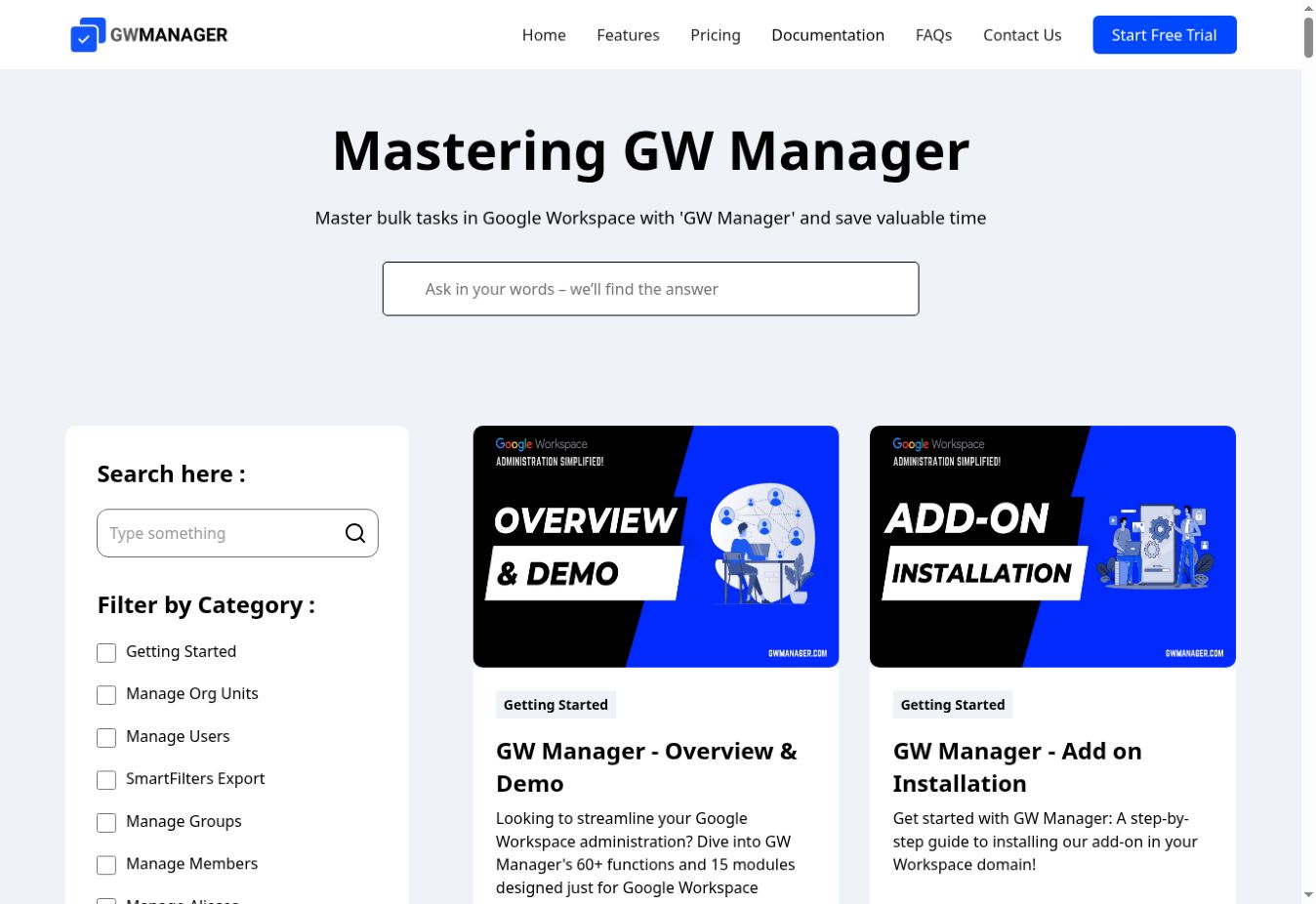
Find the task you need in the GW Manager documentation library.
Here's why I put value on that format:
- Watch first: see how the task works before changing your own data.
- Follow the screenshots: recognize the sidebar, sheet, and controls when it's your turn.
- Read the steps: return to one detail without replaying an entire video.
- Check the outcome: know what a completed job should look like.
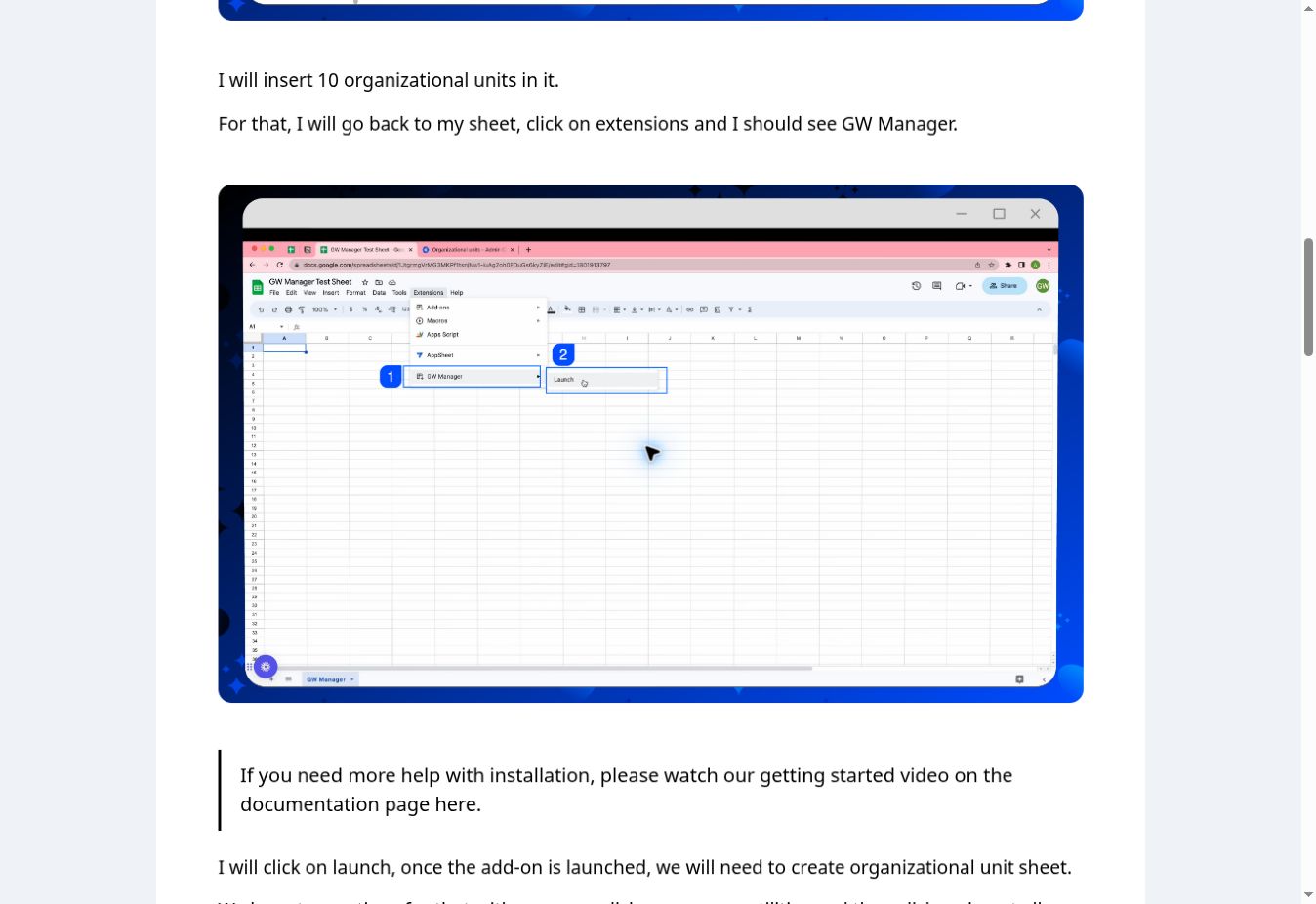
The OU tutorial shows where to click, alongside the written explanation. Its video is available on the same page.
Think about handing a task to another member of your IT team. You can send them the guide for that exact job. They can see what to enter, where to run it, and how to check the result.
That is part of the value you're getting with GW Manager: help using the features you've paid for.
5. See What Happened to Every Row
Bulk actions need clear results. If you submit ten records, you should be able to tell which ones completed and which need correcting.
GW Manager shows task status and writes results to the task sheet. You can also verify the change in the Google Admin console.
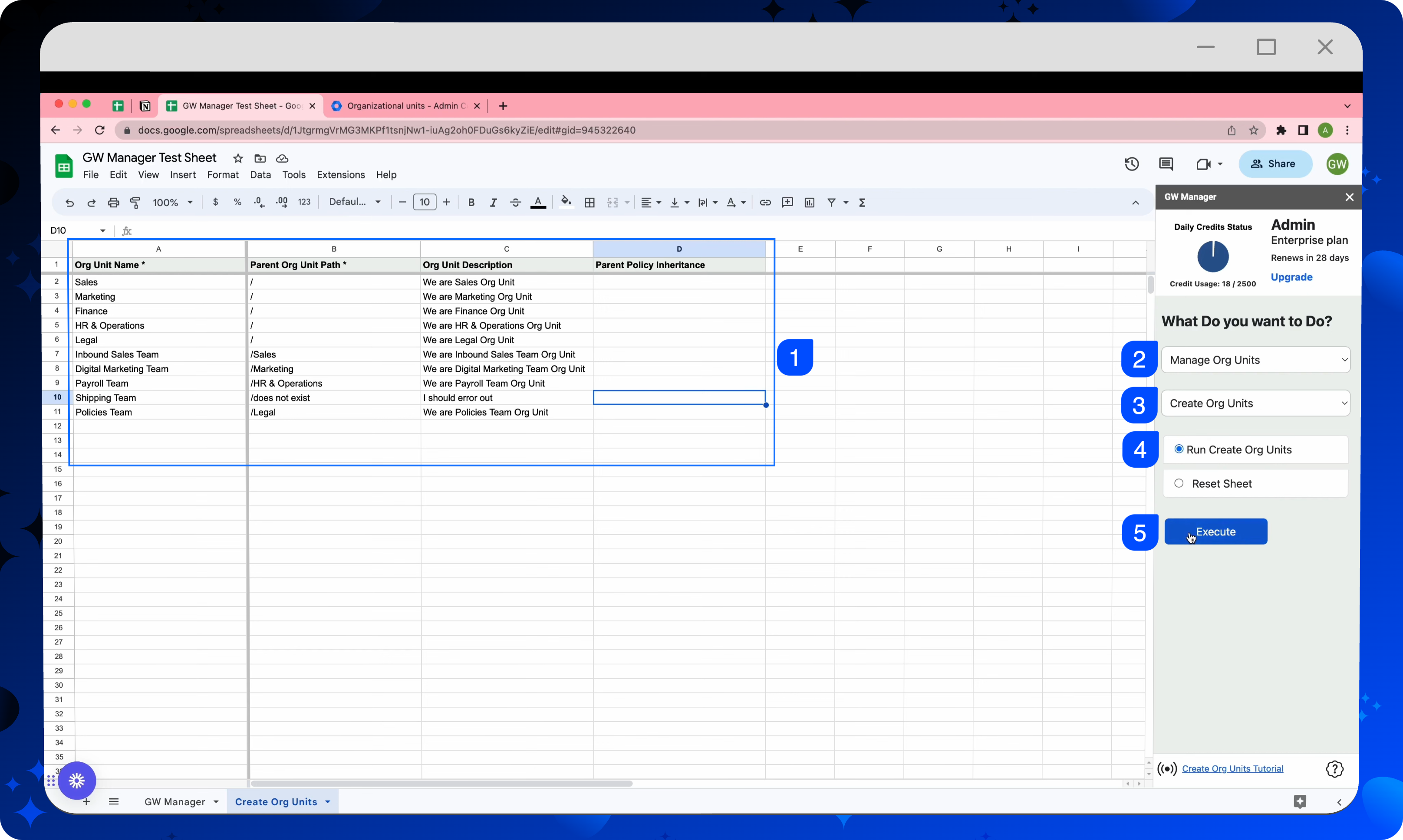
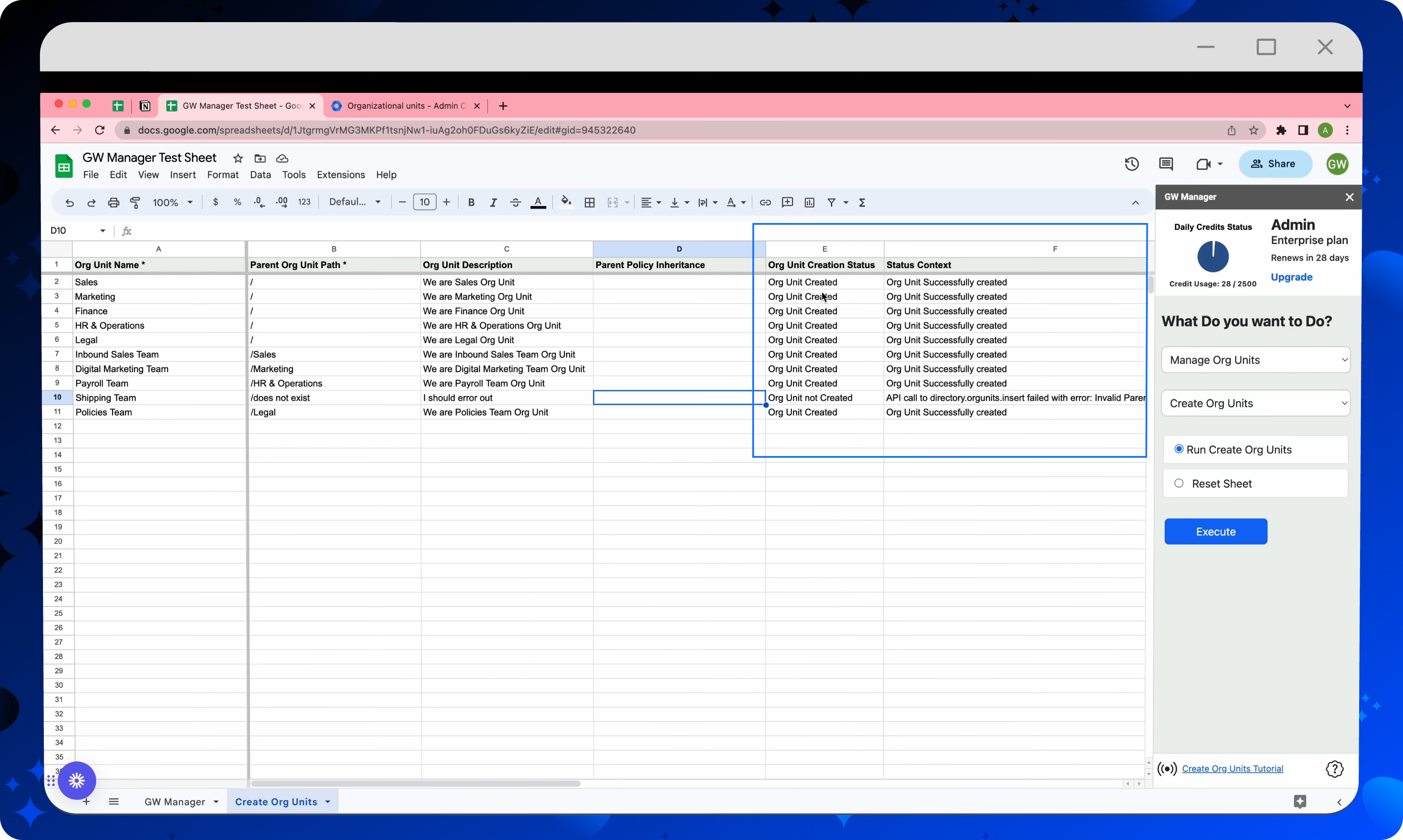
Here is an example from our original OU documentation. It requests ten OUs and deliberately includes one invalid parent path. Nine requests succeed; the invalid one returns an error. These original screenshots illustrate the workflow; interface styling and historical plan counters may differ today.
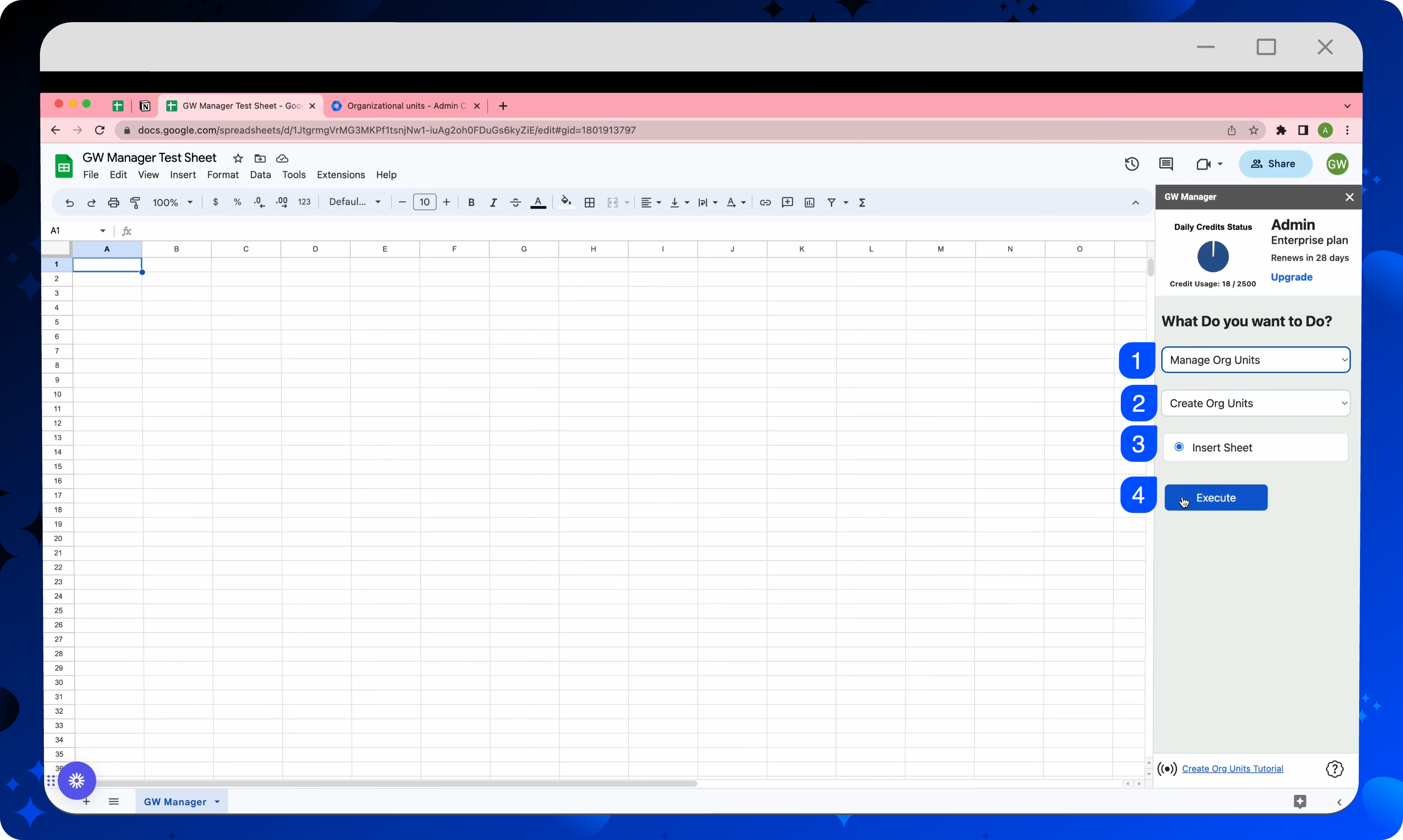
Select the Task in the Sidebar
Choose Manage Org Units, then Create Org Units. Insert the task sheet if it is missing; use the existing one if it is already there.
Prepare the Batch and Execute
Each row contains an OU request and its parent path. Review the rows, select the run action, and execute the task.
Check the Results
The sheet shows nine successes and one invalid-parent error. You can identify the row that needs attention without guessing whether the entire batch failed.
Verify the Structure in the Admin Console
The created OUs appear in the directory structure. The displayed total also includes the existing root OU.
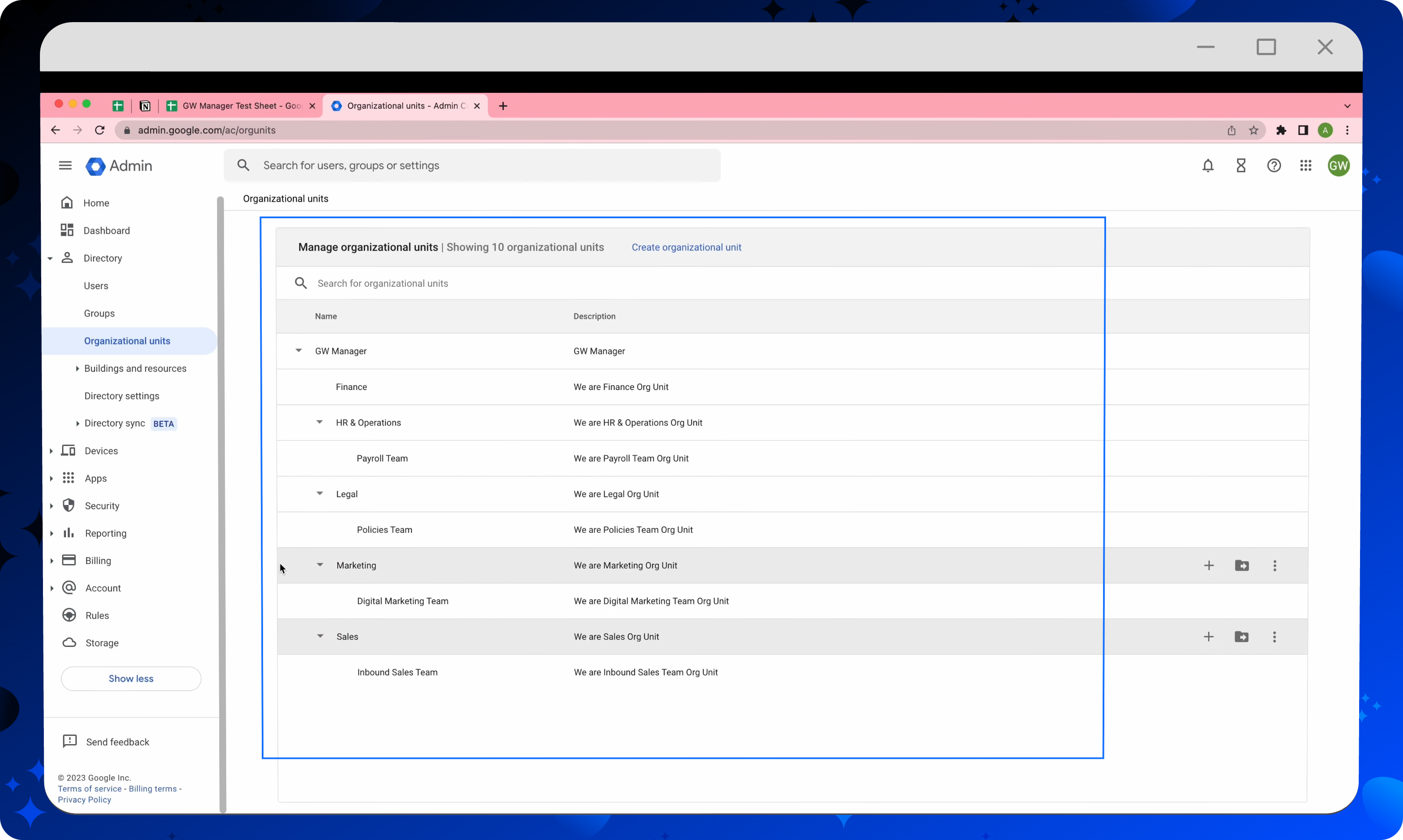
You can follow the complete OU tutorial when you're ready to try it. The same habit—prepare, run, check—helps you work through other bulk tasks with confidence.
6. Get Help With the Task You're Trying to Finish
Documentation is there to help you work independently. When you need product help, you can reach us at support@gwmanager.com.
Tell us what you're trying to accomplish and which GW Manager action you're using. If something isn't working, include the error and a screenshot with private information removed. That gives us the context to help with your actual task.
As the founder, I care about what happens after you install the add-on. The useful outcome is that you've completed your admin work and know how to repeat it next time.
Choose GW Manager for Your Next Bulk Task
Your admin workload reaches beyond creating users. The tool you choose should give you room to handle the next request without starting another product search.
That is the case for GW Manager: a broad range of bulk tasks, one familiar place to work, published pricing, and visual tutorials that show you how to use it. For school and district admins who need that range, I believe it is the stronger choice.
Start with a task that's already on your list. Find its GW Manager tutorial, follow the walkthrough, and try a small batch. Our free plan includes 20 lifetime operations so you can get a feel for the workflow before choosing a paid plan.